
This content originally appeared on Level Up Coding – Medium and was authored by Mark Lucking
Swift’s Superpower — Looping
4 Classes of Loops

Since Swift was introduced in 2014, there have been 21 versions, though some would say there are only six, with the last few having many revisions. In brutal honesty, it took about 5 years for the language to mature to the point where Apple developers stopped making major revisions. Swift 5.x [2019] was the first truly stable version, followed by Swift 6.0 [2024].
Which version of Swift you're using is directly linked to the IDE you're working in. To use Swift 6.1, you need to use Xcode 16. Of course, to use Xcode version 26.x and you’ll need to be running macOS Sonoma 14.5 or macOS Sequoia 15.x. Life is never simple.
All that said, this paper isn’t about such complexities; no, I want to talk about a computer’s superpower —looping — and the four classes of code you can use to do just that in Swift 6.x.
0. No, don’t go there
What are the four classes I am going to get to in a minute, but first a construct that has been around since the beginning of time —or rather, since 1957 —in a language called “Fortran”, a looping construct that has been copied in every other high-level language since.
You’ll even find it in assembler —widely criticised in academia and beyond these days. It was known then as “goto”; here is a simple example in Swift.
outerLoop: for i in 1...3 {
       for j in 1...3 {
           if i * j > 5 {
               break outerLoop
           }
           print("\(i) * \(j) = \(i*j)")
       }
   }
It’s unpopular because it violates structured programming principles and is very difficult to manage in a code base of any significance. But it is there if you MUST use it.
1. Traditional Loops
There are four constructs for looping around a piece of code in Swift; in fact, you’ll find them in almost all high-level languages, including the father of them all, C, albeit the syntax in the latter is slightly different.
For-in loops
// Loop through a range
   for i in 1...5 {
       print(i) // Prints 1, 2, 3, 4, 5
   }

   // Loop through a half-open range
   for i in 0..<5 {
       print(i) // Prints 0, 1, 2, 3, 4
   }

   // Loop through a collection
   let fruits = ["apple", "banana", "orange"]
   for fruit in fruits {
       print(fruit)
   }

   // Loop with index and element
   for (index, value) in fruits.enumerated() {
       print("\(index): \(value)")
   }
While loops
var counter = 0
   while counter < 5 {
       print(counter)
       counter += 1
   }
Repeat-while loops (equivalent to do-while in other languages)
var counter = 0
   repeat {
       print(counter)
       counter += 1
   } while counter < 5
Stride loops
// Count up by 2
   for i in stride(from: 0, to: 10, by: 2) {
       print(i) // Prints 0, 2, 4, 6, 8
   }

   // Count down
   for i in stride(from: 10, through: 0, by: -2) {
       print(i) // Prints 10, 8, 6, 4, 2, 0
   }
Each looping method has its uses, and you can frequently use them interchangeably. Which one you use depends on the task and the data at hand. It may also depend on the organisation's standards. NASA, for example, has this rule about loops in its coding standards.
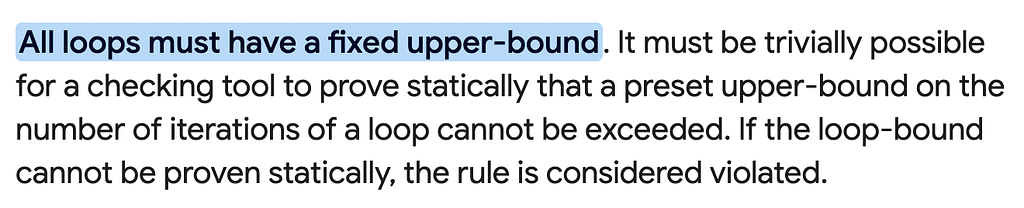
Obviously, a for-in loop at NASA will get you into hot water, so beware.
2. Recursive Loops
Still taking cues from LISP in 1958, another concept for looping that emerged in coding was recursion — code that called itself until a condition was met.
In Swift, a basic template for that looks like this.
// Basic recursive function structure:
func recursiveFunction(parameter: Type) {
    // Base case - stops recursion
    if someCondition {
        return
    }

    // Do something

    // Recursive call with updated parameters
    recursiveFunction(parameter: updatedValue)
}
Here is a real example that calculates the factorial of a given number.
func factorial(_ n: Int) -> Int {
    guard n > 1 else {
        return 1
    }

    return n * factorial(n - 1)
}
Although you need to be far more careful with recursion than with the methods outlined previously. More cautious because there are kernel limitations in the OS that will kill you, your routines using them will take more resources, and they will be more difficult to debug since they usually fail at run-time, resulting in catastrophic code crashes.
That said, sometimes that makes more sense, as in Divide-and-Conquer and Tree and Graph Traversal Algorithms. Sometimes, you even have no choice, with players like Haskell, where recursion is the primary control structure, since it lacks traditional loops. Thankfully, we’re talking Swift, which supports both!
3. Functional Constructs
These are less common in computer science classes, though I don’t know why, because they’ve been around since 1958, when LISP was developed. Swift 1.0 included three looping constructs, and Swift 4.0 added two more. They differ from the previous class in that they are all data-dependent, meaning the data itself determines how many times the loop completes.
Map
Map transforms each element in a collection using a closure and returns a new array containing the transformed elements.
// Basic syntax
let transformed = array.map { transformation }
// Converting integers to strings
let numbers = [1, 2, 3, 4, 5]
let strings = numbers.map { String($0) }
// Result: ["1", "2", "3", "4", "5"]
Filter
Filter returns a new array containing only the elements that satisfy a given condition.
// Basic syntax
let filtered = array.filter { condition }
// Getting even numbers
let numbers = [1, 2, 3, 4, 5, 6, 7, 8, 9, 10]
let evenNumbers = numbers.filter { $0 % 2 == 0 }
// Result: [2, 4, 6, 8, 10]
Reduce
Reduce combines all elements in a collection into a single value by repeatedly applying a combining operation.
// Basic syntax
let result = array.reduce(initialValue) { accumulator, element in
    return newAccumulatedValue
}
// Shorthand
let result = array.reduce(initialValue) { $0 + $1 }
// Sum of numbers
let numbers = [1, 2, 3, 4, 5]
let sum = numbers.reduce(0) { $0 + $1 }
// Result: 15 (0+1+2+3+4+5)
Combining Map, Filter, and Reduce
These methods can be chained for more complex operations:
// Sum of squares of even numbers
let numbers = [1, 2, 3, 4, 5, 6, 7, 8, 9, 10]
let sumOfSquaresOfEvens = numbers
    .filter { $0 % 2 == 0 }    // [2, 4, 6, 8, 10]
    .map { $0 * $0 }           // [4, 16, 36, 64, 100]
    .reduce(0, +)              // 220
compactMap
compactMap transforms each element using a provided closure and then removes any nil results from the final array.
let strings = ["1", "two", "3", "four", "5"]
let validNumbers = strings.compactMap { Int($0) }
// Result: [1, 3, 5]
flatMap
flatMap is used when you have nested collections (like an array of arrays) and you want to flatten them into a single-level collection.
// Example 1: Basic flatMap usage with nested arrays
let nestedArrays = [[1, 2, 3], [4, 5], [6, 7, 8, 9]]

// Using flatMap to convert [[Int]] to [Int]
let flattenedArray = nestedArrays.flatMap { $0 }

print(flattenedArray)
// Output: [1, 2, 3, 4, 5, 6, 7, 8, 9]
4. Sequence-Based Iteration
In Swift 2.0, Apple made quite a lot of hoopla around the idea of Protocol-Oriented Programming, introducing things like the sequence operator. A fourth means of looping.
Now I know what your thinking; me too. What is the difference between this and map — while there’s certainly a relationship between sequence-based operators and functions like map, but they're not the same thing.
The map operator is built upon the foundation that sequence-based operations provide. The sequence-based approach is more about defining the infrastructure for iteration, while map is a specific tool that uses that infrastructure to perform transformations.
Sequence generators:
// Sequence from a function
let fibonacci = sequence(first: 0) { a in
    let next = a + (a == 0 ? 1 : a)
    return next <= 100 ? next : nil
}
for num in fibonacci {
    print(num) // 0, 1, 2, 4, 8, 16, 32, 64
}
// Sequence with state
let powersOfTwo = sequence(state: 1) { state in
    defer { state *= 2 }
    return state <= 128 ? state : nil
}
for power in powersOfTwo {
    print(power) // 1, 2, 4, 8, 16, 32, 64, 128
}
Conclusion
All of these classes can be used to perform loops within code; which one you use is a human choice today, maybe AI in the future. It frequently comes down to experience: the more experienced you are, the more likely you are to use the features described later in this paper.
Obviously, there are other factors too, such as your organisation's rules & regulations, and their preferences regarding whether you should use functional, object-oriented, or protocol-oriented programming techniques in your code.
Swift’s Superpower — Looping was originally published in Level Up Coding on Medium, where people are continuing the conversation by highlighting and responding to this story.
This content originally appeared on Level Up Coding – Medium and was authored by Mark Lucking